Lumix S1R II video and stills photography beast -part II –
The first part of this review of the Lumix S1R II focused primarily on its features and photography capabilities.
The Video Camera
Looking at the available video formats and codecs in the menu or the manual can be overwhelming. YouTube videos often mention the camera’s internal recording capabilities, including ProRes and even ProRes RAW. Now that DaVinci Resolve can process ProRes RAW, I’d like to try it out, but unfortunately, it only supports pixel-by-pixel recording, not the full sensor resolution, a fact that’s rarely mentioned.

Standard SD cards aren’t sufficient for ProRes or All-Intra recording because they can’t handle the higher bitrates. That’s why the Lumix S1R II includes a CFexpress slot. These cards are quite expensive, but still less expensive than V90 SD cards.
For ProRes and All-Intra recordings, standard SD cards are no longer adequate because they can’t handle the higher bitrates.
Video Recording to External SSD
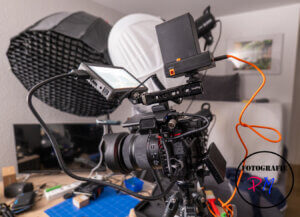
I had actually assumed I could record my YouTube videos to an SSD, just like I could with the Lumix S5 IIx. But then came the first unpleasant surprise. If you want a resolution higher than C4K, the camera displays an error message stating that you need the battery grip or the DCC18 dummy battery.
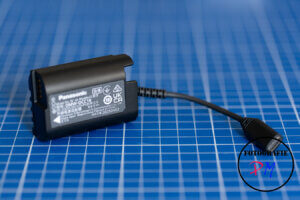
Apparently, the S1R II requires so much power that they created a new dummy battery. I’ve already reported on the power supply options, but the adapters I used for the S5 and S5 IIx didn’t work with the Lumix S1R II.
I then got this adapter, which isn’t readily available everywhere, and there aren’t any knock-offs available at the moment. With the dummy battery and a sufficiently large NP-F battery, I was able to record in 6K to an SSD with the S1R II.
Overheating
This is an issue with the Lumix S1R II, and there are countless videos on YouTube about it. First, we need to establish that the CFexpress card is a major cause of potential camera overheating. You could almost say that the faster the card is supposed to deliver or write data, the hotter it gets.
And I tested this with a 7.2K Opengate test recording. The overheating warning appeared after 11 minutes. Naturally, I don’t want to use my camera until it shuts down.
However, with the previously described DCC18 dummy battery, you can record to an external SSD, thus eliminating the two main heat sources: the battery and the CFexpress card.
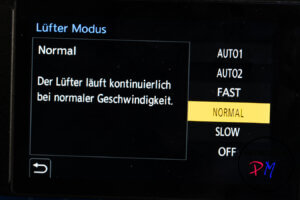
But then, with 7.2K Opengate, the overheating warning appeared after about 18 minutes, which was somewhat disappointing. However, Panasonic is being a bit overcautious in the manual, as I didn’t find the camera unpleasant to touch; it certainly wasn’t hot.
I then set the thermal management to high, and the recording ran through without any warnings. I stopped after 35 minutes because I don’t record such long clips.
With firmware update version 1.4 from November 2025, the problem was apparently solved or at least significantly improved. Of course, it’s not as warm in winter, but now I can record to a CFexpress card without worry.
Blackmagic BRAW
There’s a firmware update for Blackmagic Video Assist that allows the Lumix S1R II to record BRAW footage at a maximum resolution of 8.1K, utilizing the full sensor.
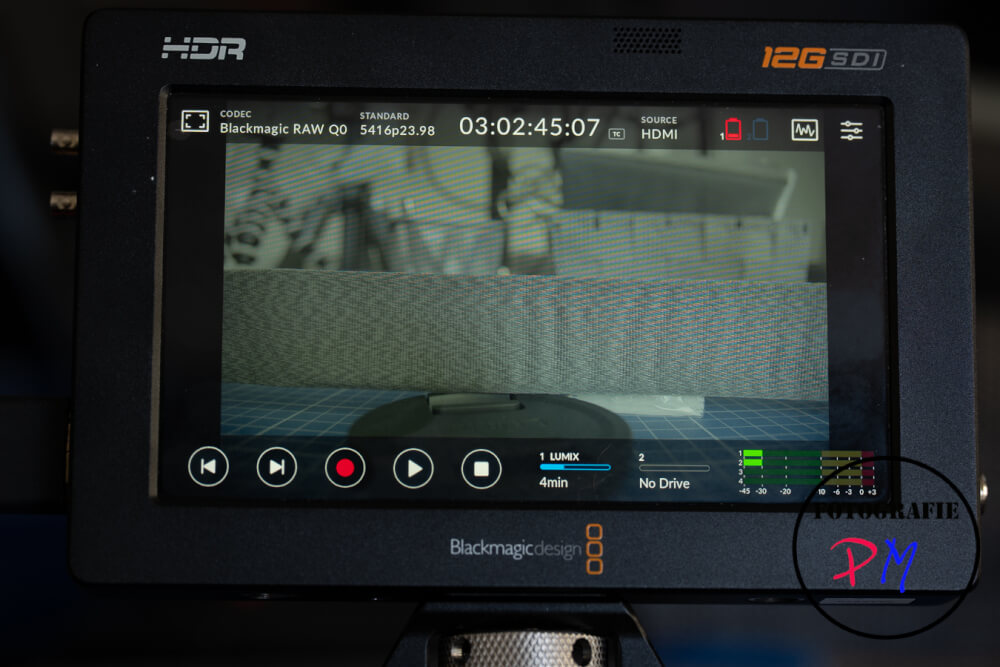
5416p is a rather strange designation for a video resolution, but at least Blackmagic has released a firmware update, even though Video Assist has been on the market for quite some time. The file sizes for various codecs are listed here.
| Programm | Win | Mac | Price | Mask | Viewpoint | 16'er Pano preview | 16'er Pano | 170'er Pano preview | 170'er Pano |
|---|---|---|---|---|---|---|---|---|---|
| PTGui 9 |  | | -- | | | 0:28 | 2:10 | 8:27 | 5:27 |
| PTGui 10 | | | 149,-- € | | | 0:22 | 0:25 | 10:46 | 2:07 |
| Pano Studio | | | 69,-- € | | | 0:26 | 1:35 | 7:09 | 7:23 |
| ICE | |  | 0,-- € | | | 1:17 | 0:18 | 34:50 | 3:52 |
| Hugin | | | 0,-- € | | | 2:57 | 19:58 | cancelled | |
| LR CC | | | | | 0:39 | 6:16 | nicht anwählbar | ||
| Autopano Giga | | | 199,-- € | | | 6:45 | 9:49 | 12:59 | 57:02 |
Conclusion
The Lumix S1R II meets my expectations in both photography (44 MP) and video (8K resolution). The clear separation of video and photo settings also makes using both modes somewhat easier. Since the firmware update, overheating is no longer an issue. The only remaining drawback is that the S1R II drains its battery quite quickly. However, Panasonic deserves credit for not compensating for this with a different battery type, as Canon did, for example.
ciao tuxoche


