UGreen NAS and the 10 GB nic
The UGreen NAS, as you know, has both a 2.5 GB and a corresponding 10 GB connection. But let’s take a look at how this translates into real-world use.
Introduction

The DXP 4800+ is certainly the only NAS in this price range that has a 10 GB interface, but isn’t the 2.5 GB interface sufficient, considering it’s already two and a half times the speed of a standard Gigabit connection?
In the first part, I already mentioned that you can easily expect transfer rates of 295 MB/s with the 2.5 GB interface.
I’ve recorded a video about this:
Hard Drives as a Bottleneck?
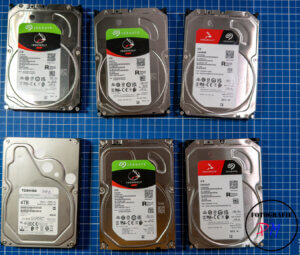
This question arises primarily because standard hard drives typically don’t offer more than 220-230 MB/s read speeds. And that’s when we’re talking about faster hard drives.
This raises the question of what practical benefit an even faster network connection offers.
It’s often recommended that even faster network connections be used, especially if you want to edit 4K video clips directly from NAS devices, for example. This might be true for multiple users, but if you’re the only user editing your video files, 2.5 GB is usually more than enough. Even a higher bitrate, such as 400 Mb/s with the Lumix S5 IIx, translates to only 50 MB/s, which then needs to be transferred via a fast network interface. Of course, the situation is different if you’re filming in ProRes or even in one of the two RAW formats.
10 Gb Network Card
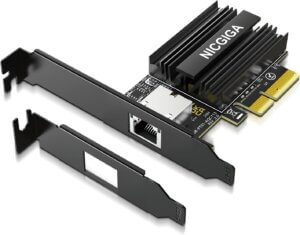
I ordered a 10 GB network card from Amazon for installation in my PC.
This network card easily delivers 9.5-9.8 Gb/s when running a test with parallel iperf3 programs.
However, the result will be disappointing if you copy, for example, a mixed collection of files with a total size of approximately 160 GB over this network interface. I tried this and measured a maximum write speed of 274 MB/s and a maximum read speed of only 224 MB/s (I can’t explain why the read speed differs so much, but the results remained consistent when running the test multiple times).
The Cache Memory
As these results show, the multi-drive hard drives are indeed the bottleneck.
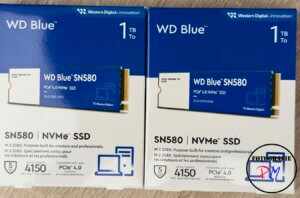
This can only be remedied by actually populating the two NVMe drive slots also available in the DXP 4800+. Two drives are necessary so that the cache can be used for both reading and writing.
Cache Memory Once this cache is set up, the aforementioned values improve to 430 MB/s for writing and 637 MB/s for reading. Here, the order is restored, as reading is significantly faster than writing, which is no surprise since the data is initially written to the cache but eventually has to be copied to the hard drives.
USB-C Netzwerk Adapter for MacBook Pro
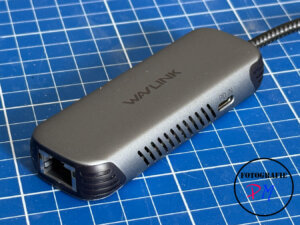
Since a 10 Gb USB-C network adapter is relatively expensive, I opted for a compromise: the 5 Gb adapter from Wavlink, which is considerably cheaper at around €50.
The adapter is initially recognized as a 2.5 Gb adapter upon plugging it in, but after installing the drivers from Wavlink or Realtek, it works perfectly with the full 5 Gb speed.
With this 5 Gb adapter, I achieve transfer rates of 480 MB/s with the cache enabled on the DXP 4800+, for both reading and writing. These are very respectable results, and I think that as an amateur, you don’t need anything more, even if you want to edit videos or photos directly from these devices.
Summary
In the following table, I’ve compiled the results of my extensive read and write test with 160 GB of mixed files, both with and without the cache.
| Adapter | R/W | Seconds | MB/sec | Seconds w. Cache | MB/sec |
|---|---|---|---|---|---|
| 2.5 GB | W | 571 | 262,33 | 629 | 238,14 |
| 2.5 | R | 691 | 216,76 | 612 | 244,74 |
| 5 GB | W | 583 | 256,93 | 308 | 486,36 |
| 5 GB | R | 695 | 215,53 | 302 | 480,22 |
| 10 GB | W | 545 | 274,85 | 337 | 430,34 |
| 10GB | R | 666 | 224,91 | 235 | 637,42 |
As you can see, the 10 GB adapter is 150 MB/s faster, but it still falls far short of the maximum possible speeds of well over 1000 MB/s.
Therefore, due to the small difference, I decided to return the 10 GB adapter and stick with the 5 GB USB-C adapter for my purposes, which I can use with both my Mac and my Windows PC.
Conclusion
Here, the excellent hardware configuration of the DXP 4800+ proves its worth once again, and it’s probably unique in this price range.
The 10 Gb option makes the NAS future-proof for future applications. It also ensures that the larger NAS models can be used in smaller teams with the appropriate interface.
ciao tuxoche


